İnşaatın iş programı kat kat, hakedişi metrajdan.Construction schedules floor by floor, progress payments from quantities.

Blok, kat ve bodrum sayısını girin; PlanLab kaba, ince ve tesisat işlerini kat kat dizer, bağları kurar, kritik yolu çıkarır. Sahadan gelen ilerleme kesit paftasında renkli yüzdelerle görünür; hakediş, metraj Excel'inizden kendiliğinden çıkar.Enter blocks, floors and basements; PlanLab lays out structure, finishes and MEP works floor by floor, links them and finds the critical path. Site progress shows as coloured percentages on the section sheet; progress payments come straight from your quantity Excel.

⚡ 1.449 görevlik plan 0,07 saniyede⚡ 1,449-task plan in 0.07 s 🤖 Yapay zekânız PlanLab'ı okur, size yol gösterir🤖 Your AI reads PlanLab and guides you Ekranda planlama serbestPlanning on screen is free Plan bilgisayarınızda kalırYour plan stays on your computer TR · EN
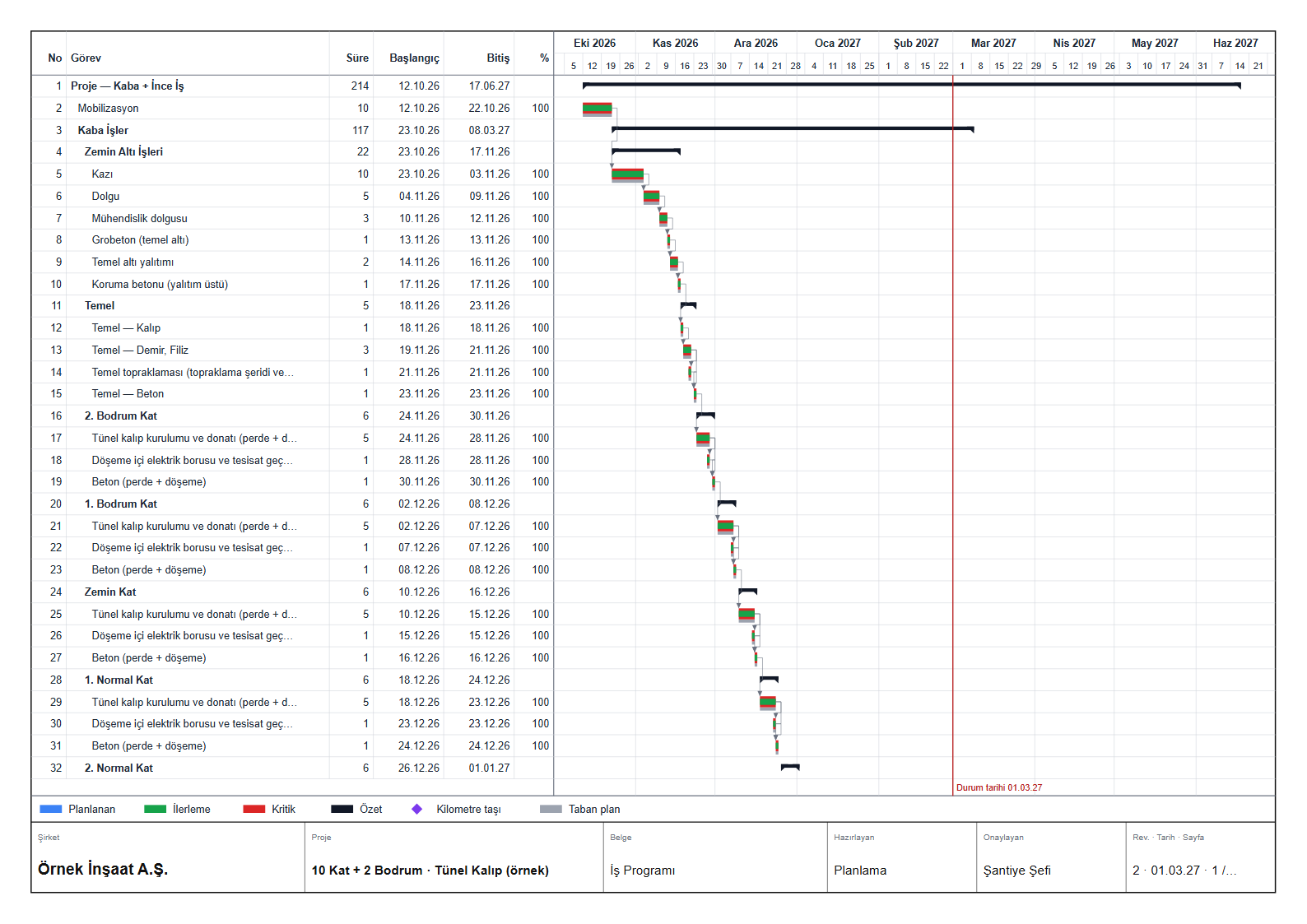
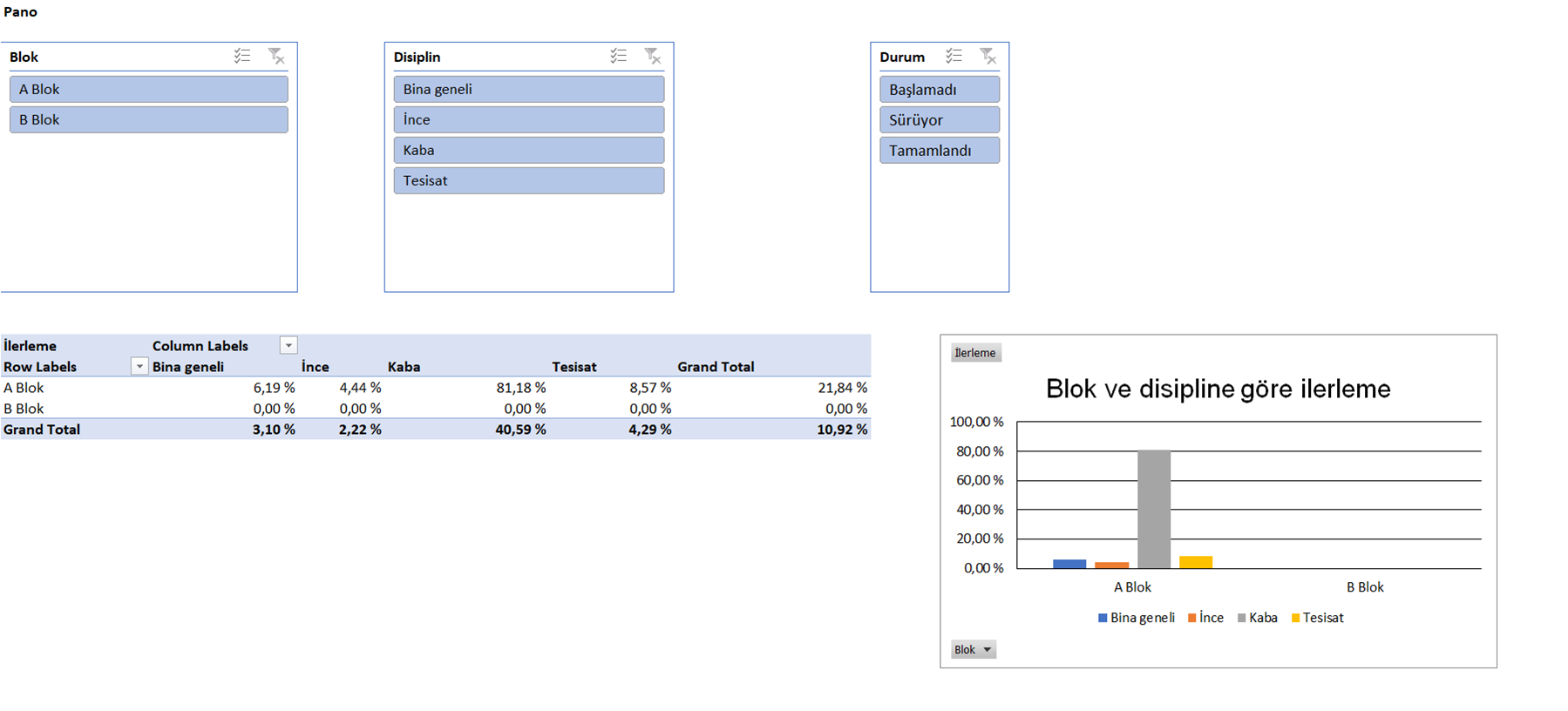
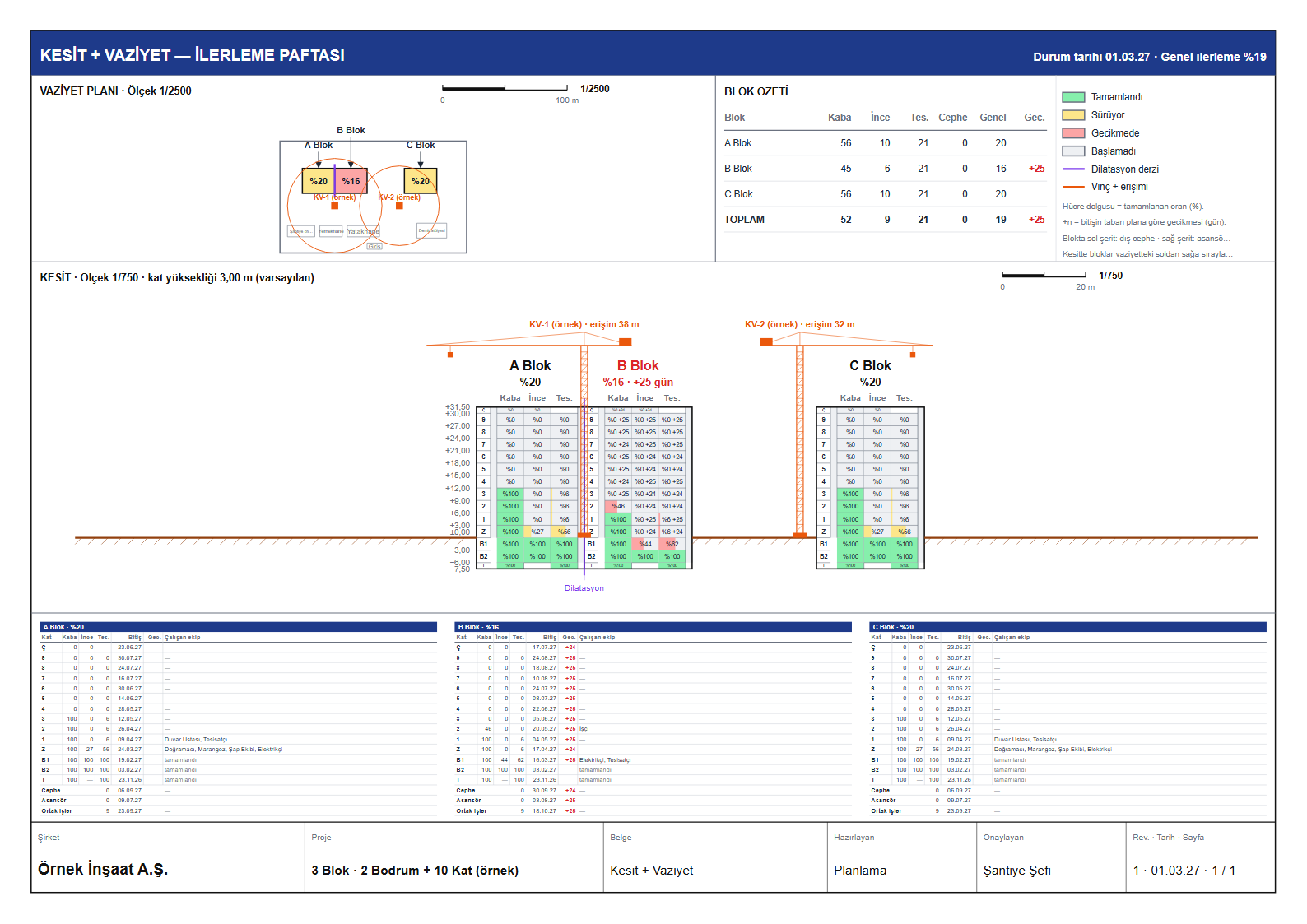
Programın ürettiği kesit + vaziyet ilerleme paftası (örnek proje, 3 blok) Programın ürettiği A3 iş programı baskısı (örnek proje) Programın ürettiği veri modelli Excel panosu (örnek proje)
Gerçek çıktı — programın ürettiği pafta, baskı ve Excel (örnek proje)Real output — sheets, prints and Excel produced by the program (sample project)

İki parça, iki paket: Bireysel · KurumsalTwo parts, two packages: Individual · Business

İş programı ve hakediş birlikte gelir — ayrı ayrı satılmaz. Aylık, 6 aylık ya da yıllık.Schedule and progress payments come together — not sold separately. Monthly, 6 months or annual.

1. parçaPart 1

📅 PlanlamaPlanning

  • Başlangıç tarihi + blok + kat + bodrum → kaba, ince ve tesisat (elektrik, mekanik, sıhhi) kat kat, bağlarıyla — bitiş tarihleri anında
  • Start date + blocks + floors + basements → structure, finishes and MEP (electrical, mechanical, plumbing) floor by floor, linked — finish dates at once
  • Gantt + kritik yol; FS / SS / FF / SF bağlarını çubuktan sürükleyerek kurma
  • Gantt + critical path; drag FS / SS / FF / SF links from the bar
  • Durum tarihi, ilerleme, gecikme ve telafi önerisi
  • Status date, progress, delay and recovery suggestions
  • Ölçekli baskı A4 – A0: PDF + DXF (AutoCAD katmanlı)
  • Scaled printing A4 – A0: PDF + DXF (AutoCAD layers)
  • Kesit + vaziyet paftası: kat kat renkli ilerleme yüzdeleri, DXF / DWG okuma
  • Section + site plan sheet: coloured floor-by-floor progress, DXF / DWG reading
  • 15 rapor + veri modelli Excel: DAX ölçüleri, Power Query, özet tablo, dilimleyici
  • 15 reports + data-model Excel: DAX measures, Power Query, pivots, slicers
2. parçaPart 2

🧾 HakedişProgress payments

  • Metraj Excel'inden bütün hakedişler (her hakediş no ayrı)
  • All progress payments from the quantity Excel (one per payment no.)
  • Yeşil defter: önceki + bu dönem = toplam
  • Cumulative ledger: previous + this period = total
  • İmalat icmali ve kesintiler (avans, teminat, ceza)
  • Works summary and deductions (advance, bond, penalty)
  • KDV · tevkifat · stopajlı arka kapak
  • Cover sheet with VAT · withholding · stoppage
  • Hakediş panosu (.xlsx): poz özeti, blok × kat, poz × hakediş, trend
  • Payment dashboard (.xlsx): item summary, block × floor, item × payment, trend
BİREYSELINDIVIDUALPlanLab
İş programı + hakediş, kişisel kullanım · 1 kullanıcı · tek blok · ✕ kesit + vaziyet paftası, amblem, kendi şablonu, maliyet / kaynak / nakit çıktısı yok (Kurumsal'da)Schedule + progress payments, personal use · 1 user · single block · ✕ no section + site plan sheet, emblem, own template, cost / resource / cash-flow outputs (Business)
$200 /yıl
Üye olJoin
KURUMSALBUSINESSPlanLab BÜTÜN ÖZELLİKLEREVERY FEATURE
İş programı + hakediş, şirket kullanımı · aynı firmada 5 kullanıcıya kadar · çok blok · kesit + vaziyet paftası · şirket amblemli antet · kendi şablonu · maliyet / kaynak / nakit akışı çıktısıSchedule + progress payments, company use · up to 5 users in the same company · multiple blocks · section + site plan sheet · company emblem title block · own template · cost / resource / cash-flow outputs
$500 /yıl
Üye olJoin

Ödeme Polar üzerinden (kart, vergi ve fatura Polar'da). Üyelik kodunuz e-postanıza gelir ve ödemeden sonra programda kendiliğinden açılır. Ekranda planlama herkese serbesttir; baskı, PDF, DXF, Excel, rapor dosyası ve hakediş üyelikle; ileri özellikler Kurumsal üyelikte.Payment via Polar (card, tax and invoice handled by Polar). Your membership code is e-mailed and unlocks automatically after payment. Planning on screen is free for everyone; printing, PDF, DXF, Excel, report files and progress payments come with a membership; advanced features on Business.

Hız: saniyeler değil, saniyenin kesirleriSpeed: not seconds — fractions of a second

3 blok × 12 kat + 2 bodrumluk bir proje — sihirbazın ürettiği tam plan:A project of 3 blocks × 12 floors + 2 basements — the full plan the wizard creates:

1.449görev, bağlarıyla birliktetasks, with their links
0,07 snsihirbazdan tam planafrom wizard to full plan
0,02 snA1 kesit paftası + DXFA1 section sheet + DXF
3 sn15 raporun hepsiall 15 reports

15.10.2026'da geliştirme bilgisayarında ölçüldü; tarayıcınızda süre bilgisayarınıza göre değişir.Measured on the development computer on 15 Oct 2026; in your browser timings depend on your computer.

Planlamada yeniliklerWhat's new in planning

Şantiyede gerçekten lazım olanlar — ekrandan çıkıp kâğıda, AutoCAD'e ve Excel'e giden.What the site really needs — from the screen to paper, AutoCAD and Excel.

🏗️

Kesit + vaziyet paftası

Section + site plan sheet

Vaziyet üstte, kesit altta; her katın kaba / ince / tesisat yüzdesi renkli. Ölçekli ya da kâğıda sığdır; blok adları kesitin üstünde, planda okla.

Site plan on top, section below; each floor's structure / finishes / MEP percentage in colour. Scaled or fit-to-paper; block names above the section, with arrows on the plan.

📐

DXF / DWG vaziyet okuma

DXF / DWG site plan reading

Katmanları aç / kapa, renk, yeniden adlandır; poligon ve yazılardan blok, yol, tretuvar, otopark tanıma; çizim ölçeği 1/50 – 1/5000.

Layers on / off, colour, rename; recognise blocks, roads, pavements, parking from polylines and texts; drawing scale 1/50 – 1/5000.

🔗

Çubuktan bağ çizme

Draw links from the bar

Çubuğun başından ya da sonundan sürükleyin: FS, SS, FF, SF bağı bıraktığınız yere göre kurulur.

Drag from a bar's start or end: FS, SS, FF or SF is set by where you drop.

🧱

Kat kat sihirbaz

Floor-by-floor wizard

Kaba, ince ve tesisat (elektrik, mekanik, sıhhi) kalemleri kat başına; çatı, cephe, peyzaj, abonelikler ve devreye alma dahil.

Structure, finishes and MEP (electrical, mechanical, plumbing) per floor; roof, facade, landscaping, utilities and commissioning included.

📊

DAX'lı Excel

Excel with DAX

Gerçek veri modeli: tablolar, ilişkiler, DAX ölçüleri, Power Query, özet tablo ve dilimleyici — gerçek Excel'de açılıp sınandı.

A real data model: tables, relationships, DAX measures, Power Query, pivots and slicers — opened and checked in real Excel.

🚨

Erken uyarı: geç kalıyor muyuz?

Early warning: are we running late?

Durum tarihine göre geciken, başlamayan, geride kalan iş; bu hızla tahmini bitiş; taban plana göre kayma; son tarih ve kaynak aşımı; kritik yoldakiler önce.

Late, unstarted and behind work as of the status date; projected finish at the current pace; slip against the baseline; deadlines and over-allocation; critical path first.

🔁

MS Project ve Primavera ile alışveriş

Exchange with MS Project and Primavera

MS Project XML ve Primavera P6 XER aç / kaydet; kendi dosyanız .planlab her şeyi saklar. Excel'den görev al, iCal ver.

Open / save MS Project XML and Primavera P6 XER; your own .planlab file keeps everything. Import tasks from Excel, export iCal.

🖨️

A4'ten A0'a baskı

Print A4 to A0

Antetli, ölçekli, renkli; aynı sayfa PDF'e ve katmanlı DXF'e çıkar.

Title block, scale, colour; the same sheet goes to PDF and layered DXF.
Gerçek çıktılarReal outputs

Aşağıdakiler programın ürettiği dosyalardan alınmış görüntülerdir — çizim ya da süsleme değil.These are taken from files the program produced — not mock-ups.

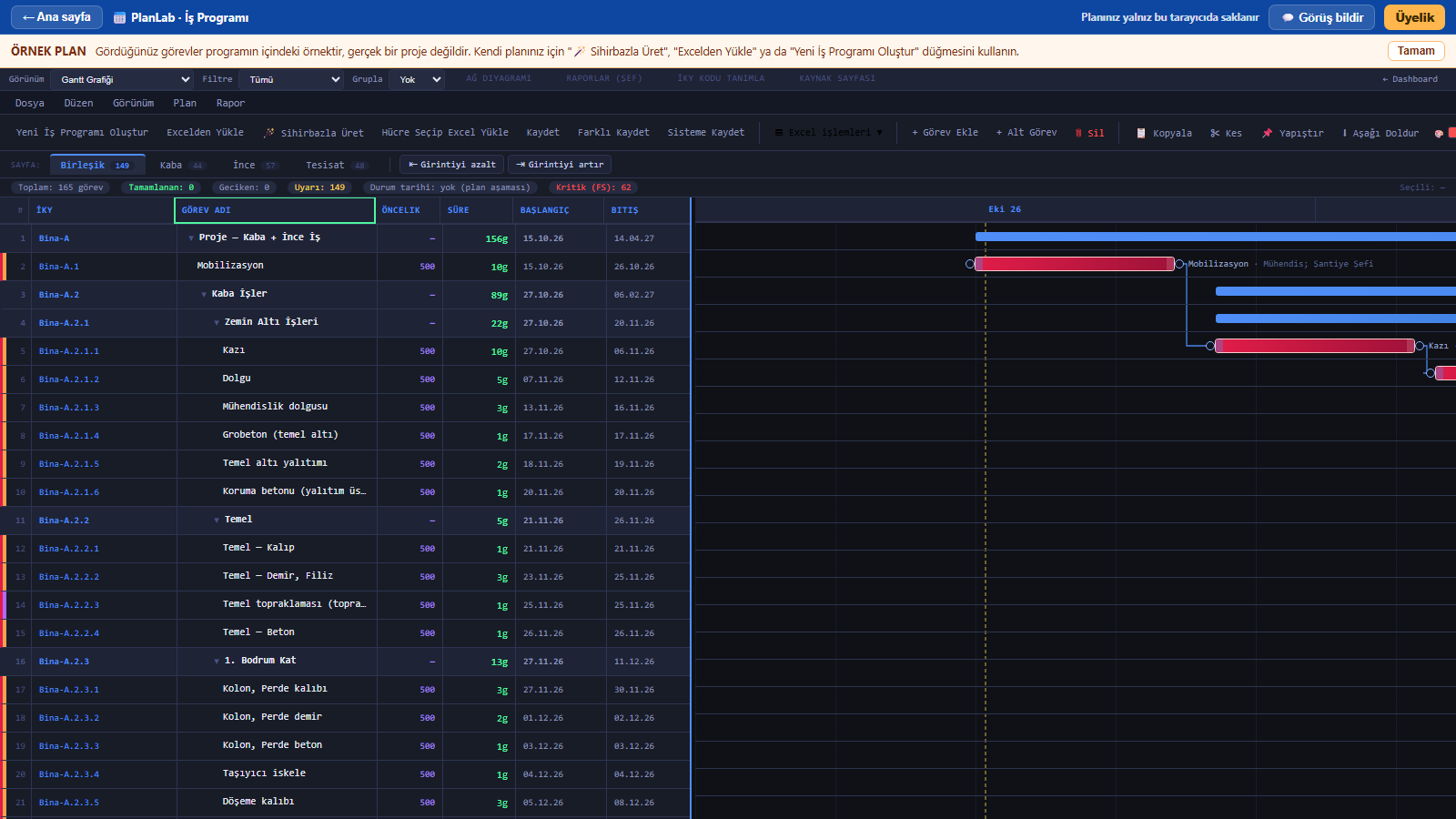
PlanLab Gantt ekranı
Gantt + kritik yolGantt + critical path — sihirbazın ürettiği kat kat planthe floor-by-floor plan from the wizard
Kesit ve vaziyet paftası
Kesit + vaziyet paftasıSection + site plan sheet — kat kat ilerleme yüzdelerifloor-by-floor progress
A3 iş programı baskısı
Ayrıntılı iş programı baskısıDetailed schedule print — A3, antetli; kat kat görevler, bağlar, ilerleme, kritik yolA3 with title block; floor-by-floor tasks, links, progress, critical path
Veri modelli Excel iş programı panosu
Veri modelli ExcelData-model Excel — DAX ölçüleri, özet tablo, dilimleyiciDAX measures, pivots, slicers
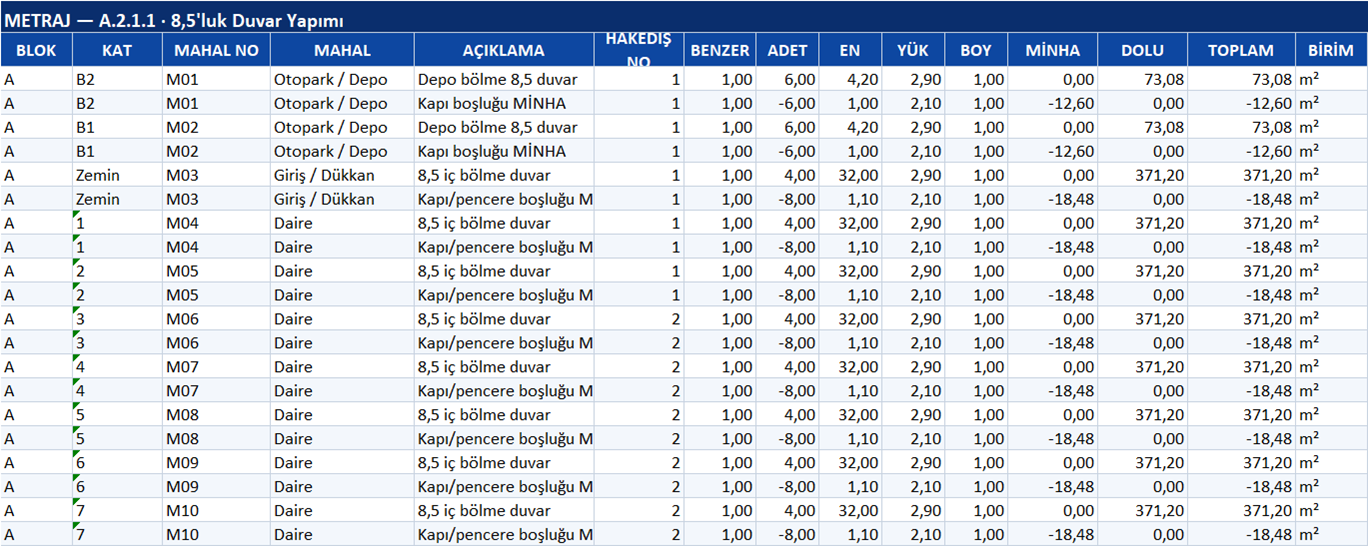
Hakediş Excel çıktısı
HakedişProgress payment — metrajdan icmal ve arka kapakworks summary and cover sheet from quantities

Örnek dosyaları indirinDownload sample files

Hakediş zinciriThe payment chain

📏 MetrajQuantitiespoz · blok · kat · miktaritem · block · floor · qty
➜
📗 Yeşil defterLedgerönceki + bu dönem = toplamprevious + this = total
➜
🧮 İmalat icmaliWorks summarymiktar × birim fiyatqty × unit price
➜
✂️ KesintilerDeductionsavans · teminat · cezaadvance · bond · penalty
➜
📄 Arka kapakCover sheetKDV → tevkifat → stopaj → netVAT → withholding → stoppage → net
TEKLİF İSTEYİNREQUEST A QUOTE

Online Sanal Teknik OfisOnline Virtual Technical Office

Çizimden metraja, metrajdan icmale, icmalden hakedişe tek hat. Mahal mahal ve eleman eleman, kaynağı gösteren, tekrar üretilebilir metraj — iş programı ve hakedişle aynı veri modelinde. Projenizi yükleyin, bütçenizi bildirin, teklif isteyin.One line from drawing to quantities, quantities to summary, summary to payment. Room-by-room and element-by-element take-off that shows its source and can be regenerated — in the same data model as the schedule and payments. Upload your project, tell us your budget, request a quote.

⚡

Hızlı metraj

Fast take-off

Çizimden doğrudan; elle sayım yok.

Straight from the drawing; no manual counting.

🚪

Mahal mahal

Room by room

Her mahalin döşeme, duvar, tavan kalemleri ayrı.

Floor, wall and ceiling items per room.

🧱

Eleman eleman

Element by element

Kolon, kiriş, perde, döşeme — her biri izlenebilir.

Columns, beams, walls, slabs — each traceable.

📑

Metraj · icmal · hakediş

Quantities · summary · payment

Poz bazında icmal; hakedişe ve iş programına bağlı.

Item summary linked to payments and the schedule.

Teknik ofis işinizi biz hazırlayalımLet us prepare your technical office work

Teslim PlanLab ve Excel dosyası olarak — sizin elinizde kalır.Delivered as PlanLab and Excel files that stay with you.

BIMMetrajQuantity take-offKeşifCost estimateİş programıSchedulesHakedişProgress paymentsŞantiye raporlarıSite reports
  1. Projenizi yükleyin (DWG, DXF, PDF, Excel, ZIP).
  2. Upload your project (DWG, DXF, PDF, Excel, ZIP).
  3. İşi ve bütçenizi yazın.
  4. Describe the job and your budget.
  5. Kapsam, süre ve teklifle size dönelim.
  6. We reply with scope, timing and a quote.
Dosyalarınız özel bir depoda saklanır, yalnız teklif için açılır; iletişim bilginiz yayınlanmaz.Your files are kept in private storage and opened only for the quote; your contact details are never published.

🤖 Kendi yapay zekânıza okutunLet your own AI read it

PlanLab'ın ne yaptığını ve adım adım nasıl kullanıldığını yapay zekâların okuyacağı biçimde yazdık. Asistanınıza bu bağlantıyı verin; size "şunu yapalım, şuraya şunu girin" diye yol göstersin.We wrote what PlanLab does and how to use it step by step in a form AI assistants can read. Give your assistant this link and let it guide you: "let's do this, enter that here".

https://dataflow.builders/planlab-ai.md "Bu belgeyi oku; 2 bloklu, 8 katlı konut için PlanLab'da iş programını adım adım birlikte kuralım.""Read this document; let's build the schedule for a 2-block, 8-storey housing project in PlanLab step by step."

Sık sorulanlarFAQ

Planım nerede saklanıyor?Where is my plan stored?

Tarayıcınızda, kendi bilgisayarınızda. Sunucumuza gitmez. Başka bilgisayarda açmak için "Proje dosyası kaydet" ile dosyayı alın — bu her zaman serbesttir.

In your browser, on your own computer. It never goes to our server. To open it elsewhere, use "Save project file" — always free.

Üye olmadan ne yapabilirim?What can I do without a membership?

Sihirbaz, Gantt, kritik yol, ilerleme, kesit ve vaziyet ekranı — hepsi ekranda serbest. Baskı, PDF, DXF, Excel ve rapor dosyası üyelikle açılır.

Wizard, Gantt, critical path, progress, section and site plan screens — all free on screen. Printing, PDF, DXF, Excel and report files unlock with a membership.

Ödeme ve fatura nasıl?How do payment and invoicing work?

Ödemeyi Polar alır (kart, vergi, fatura onlarda). Ödemeden sonra programa dönersiniz, üyeliğiniz kendiliğinden açılır; kod ayrıca e-postanıza gelir.

Polar takes the payment (card, tax, invoice). After paying you return to the program and the membership unlocks automatically; the code is also e-mailed.

Aylık üyeliği bırakabilir miyim?Can I cancel the monthly plan?

Evet; abonelik Polar müşteri sayfasından iptal edilir, dönem sonuna kadar kullanırsınız. 6 aylık üyelik tek seferlik ödemedir, yenilenmez.

Yes; cancel from the Polar customer page and keep using it until the period ends. The 6-month plan is a one-time payment and does not renew.

MS Project ya da Primavera dosyamı açabilir miyim?Can I open my MS Project or Primavera file?

Evet: MS Project XML ve Primavera P6 XER açılır ve bu biçimlerde kaydedilir. .mpp dosyası kapalı bir biçimdir; MS Project'te "Farklı Kaydet > XML Biçimi" ile kaydedip açın.

Yes: MS Project XML and Primavera P6 XER open and save. .mpp is a closed format; save it as XML in MS Project first.

Kendi şablonumu, kendi metraj Excel'imi kullanabilir miyim?Can I use my own template and quantity Excel?

Evet. Sihirbaz şablonu dışa / içe aktarılır; hakediş metraj Excel'inizdeki sütunları tanır. Yardıma ihtiyacınız olursa programdaki "Görüş bildir" ile yazın.

Yes. Wizard templates export / import; the payment module recognises the columns in your quantity Excel. If you need help, write via "Feedback" in the program.